Samsung 970 Evo Plus vs 990 Pro – Check Which One Is Best & Why?

Samsung 990 Pro & Samsung 970 Evo Plus share many similarities, but there are also important differences, such as quality, performance, features, design, and connectivity. If you want the best one between them, I Would recommend the Samsung 990 Pro rather than the Samsung 970 Evo Plus. 
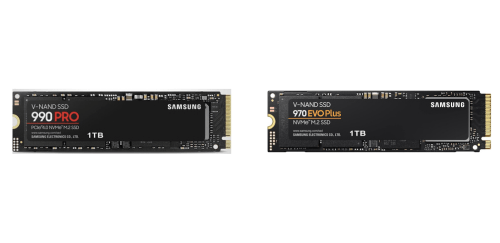
Why Do I Recommend The Samsung 990 Pro

  • The Samsung 990 Pro has a PCIe 4.0 x4 interface for nearly double bandwidth and faster data throughput in modern systems, while the Samsung 970 Evo Plus uses a PCIe 3.0 x4 interface.
  • The Samsung 990 Pro features up to 7,450 MB/s sequential read speeds to significantly reduce game load times and large file access delays, whereas the Samsung 970 Evo Plus has up to 3,500 MB/s sequential read speeds.
  • The Samsung 990 Pro comes with up to 6,900 MB/s sequential write performance for much faster large file transfers and content exports, compared to the Samsung 970 Evo Plus which has up to 3,300 MB/s sequential write speeds.
  • The Samsung 990 Pro includes a newer-generation controller for higher random IOPS and smoother multitasking under heavy workloads, while the Samsung 970 Evo Plus uses an older controller with lower random performance limits.
  • The Samsung 990 Pro supports NVMe 2.0 for improved command handling efficiency and lower latency in advanced workloads, whereas the Samsung 970 Evo Plus supports NVMe 1.3.
  • The Samsung 990 Pro features improved power efficiency per performance level to deliver higher speeds without proportional increases in power consumption, compared to the Samsung 970 Evo Plus which is less efficient at peak performance.
  • The Samsung 990 Pro supports higher sustained performance for demanding tasks like video editing and large game installs, while the Samsung 970 Evo Plus reaches its performance ceiling sooner due to PCIe 3.0 limitations.
  • The Samsung 990 Pro comes in higher maximum capacity options up to 4TB for larger game libraries and professional data storage, whereas the Samsung 970 Evo Plus is limited to lower maximum capacities.

Maybe the Samsung 970 Evo Plus price can make you comfortable because it’s a little bit cheaper than the Samsung 990 Pro. But you have to compromise all the above-mentioned features. Now the Decision is Yours. I hope it was helpful to choose the right one.

Side By Side Comparison

FeatureSamsung 990 ProSamsung 970 Evo Plus
InterfacePCIe 4.0 x4PCIe 3.0 x4
NVMe versionNVMe 2.0NVMe 1.3
Seq. read (max)Up to 7,450 MB/sUp to 3,500 MB/s
Seq. write (max)Up to 6,900 MB/sUp to 3,300 MB/s
Random read (max)Up to 1,400K IOPSUp to 620K IOPS
Random write (max)Up to 1,550K IOPSUp to 560K IOPS
ControllerSamsung PascalSamsung Phoenix
Heatsink optionYesNo
Power efficiencyHigherLower
DirectStorage readinessBetter suitedLess suited
Peak power drawHigherLower
Typical temps (load)HigherLower
PCIe 3.0 behaviorRuns at PCIe 3.0 speedsNative PCIe 3.0 speeds
Supported capacities1TB / 2TB / 4TB250GB / 500GB / 1TB / 2TB
Firmware generationNewerOlder
Performance ceilingGen4-classGen3-class
PriceCheck 990 Pro PriceCheck 970 Evo Plus Price

What Common Both Can Do?

  • Form factor: Both drives use the standard M.2 2280 size, making them compatible with the vast majority of modern desktops and laptops. This ensures easy installation without adapters in most consumer systems.
  • Interface type: Each model is an NVMe solid-state drive, meaning they communicate over the NVMe protocol rather than SATA. NVMe enables lower latency and higher efficiency for modern operating systems and applications.
  • NAND type: Both the Samsung 990 Pro and Samsung 970 Evo Plus rely on 3-bit TLC V-NAND technology. This provides a balance between performance, endurance, and cost suitable for mainstream and enthusiast users.
  • DRAM cache: Each drive includes onboard DRAM to store mapping tables for the controller. This improves sustained performance and responsiveness compared to DRAM-less SSDs.
  • TRIM support: Both SSDs support the TRIM command, allowing the operating system to inform the drive which blocks are no longer in use. This helps maintain long-term performance and drive health.
  • S.M.A.R.T. support: Each model supports S.M.A.R.T. monitoring, enabling users to track drive health, temperature, and error rates. This is important for early detection of potential issues.
  • AES 256-bit encryption: Both drives feature hardware-based AES 256-bit encryption. This allows data to be secured at rest without a significant performance penalty.
  • TCG Opal support: Each SSD supports the TCG Opal security standard, enabling advanced drive-level encryption and secure management in supported systems.
  • Windows compatibility: Both models are fully compatible with modern versions of Windows. This ensures stable operation for gaming, productivity, and professional workloads.
  • Linux compatibility: Each drive works reliably with Linux distributions that support NVMe storage. This makes them suitable for developers, servers, and dual-boot systems.
  • Samsung Magician support: Both SSDs are supported by Samsung Magician software. This allows firmware updates, health monitoring, performance optimization, and secure erase features.
  • Low-power idle states: Each drive supports low-power states when idle. This helps reduce energy consumption, especially in laptops and compact systems.
  • Shock resistance: Both SSDs are resistant to shock due to having no moving parts. This improves durability compared to traditional hard drives.
  • Vibration resistance: Each model is inherently resistant to vibration, which contributes to reliability in mobile or compact environments.
  • Wear-leveling support: Both drives implement wear-leveling algorithms to distribute writes evenly across NAND cells. This extends the overall lifespan of the SSD.
  • Garbage collection: Each SSD uses internal garbage collection to manage unused blocks efficiently. This helps sustain performance over time.
  • Thermal monitoring: Both drives actively monitor operating temperatures. This allows the controller to manage performance and prevent overheating.
  • Client SSD class: Each model is designed as a client-grade SSD rather than an enterprise drive. This makes them optimized for consumer and enthusiast workloads such as gaming, content creation, and everyday computing.

Common Features

FeatureSamsung 990 ProSamsung 970 Evo Plus
Form factorM.2 2280M.2 2280
Interface typeNVMe SSDNVMe SSD
NAND type3-bit TLC V-NAND3-bit TLC V-NAND
DRAM cacheYesYes
TRIM supportYesYes
S.M.A.R.T. supportYesYes
AES 256-bit encryptionYesYes
TCG Opal supportYesYes
Windows compatibilityYesYes
Linux compatibilityYesYes
Samsung Magician supportYesYes
Low-power idle statesYesYes
Shock resistanceYesYes
Vibration resistanceYesYes
Wear-leveling supportYesYes
Garbage collectionYesYes
Thermal monitoringYesYes
Client SSD classYesYes
Price Check 990 Pro Price Check 970 Evo Plus Price

FAQ

Is Samsung 990 Pro compatible with systems that support Samsung 970 Evo Plus?
Yes, both drives use the M.2 2280 form factor and NVMe protocol, so Samsung 990 Pro can physically fit and function in any system that supports Samsung 970 Evo Plus, though it will operate at PCIe 3.0 speeds in older systems.

Do both Samsung 990 Pro and Samsung 970 Evo Plus require a heatsink?
Neither drive strictly requires a heatsink for basic operation, but Samsung 990 Pro may benefit more from additional cooling under heavy workloads due to its higher performance output.

Are both SSDs suitable for gaming PCs?
Yes, both drives are suitable for gaming PCs, providing fast load times and smooth gameplay, although Samsung 990 Pro delivers higher peak performance in modern systems.

Can both drives be used as a primary boot drive?
Yes, both Samsung 990 Pro and Samsung 970 Evo Plus are commonly used as primary boot drives for operating systems and applications.

Do both SSDs support hardware-based encryption?
Yes, both models support hardware-based AES 256-bit encryption along with TCG Opal standards for data security.

Is Samsung Magician software supported on both drives?
Yes, both SSDs are fully supported by Samsung Magician software for monitoring, firmware updates, and drive optimization.

Are both SSDs compatible with laptops as well as desktops?
Yes, both drives are compatible with laptops and desktops that support M.2 NVMe storage and the 2280 size format.

Do both models use TLC NAND memory?
Yes, both Samsung 990 Pro and Samsung 970 Evo Plus use 3-bit TLC V-NAND, balancing performance, endurance, and cost.

Is there a noticeable difference in everyday tasks between the two drives?
In typical everyday tasks like web browsing and office work, both drives perform very similarly, as these tasks rarely saturate NVMe bandwidth.

Can both drives handle large file transfers?
Yes, both drives can handle large file transfers reliably, though Samsung 990 Pro completes them faster in PCIe 4.0-capable systems.

Do both SSDs support TRIM and garbage collection?
Yes, both drives support TRIM and internal garbage collection to maintain consistent performance and longevity over time.

Are both models reliable for long-term use?
Yes, both drives are designed for long-term consumer use and include wear-leveling and health monitoring features to maintain reliability.

Can either SSD be used in a PlayStation 5?
Samsung 990 Pro meets the performance requirements for PlayStation 5 storage expansion, while Samsung 970 Evo Plus does not meet Sony’s recommended speed specifications.

Do both drives support low-power states for energy efficiency?
Yes, both SSDs support low-power idle states, helping reduce energy consumption, especially in laptops.

Is upgrading from Samsung 970 Evo Plus to Samsung 990 Pro worthwhile?
The upgrade can be worthwhile for users with PCIe 4.0 systems who need higher sustained performance, while users with PCIe 3.0 systems may see limited practical gains.

Quick Deal Access