Samsung 990 Pro & Samsung 970 Evo share many similarities, but there are also important differences, such as quality, performance, features, design, and connectivity. If you want the best one between them, I Would recommend the Samsung 990 Pro rather than the Samsung 970 Evo.
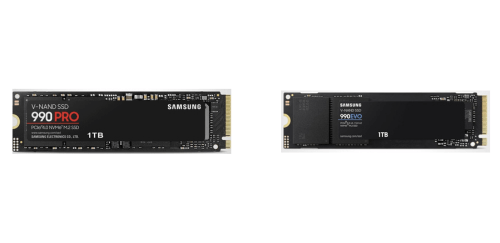
Why Do I Recommend The Samsung 990 Pro?
- The Samsung 990 Pro has PCIe Gen 4 x4 support for significantly higher bandwidth and faster data transfers in modern systems, while the Samsung 970 Evo uses PCIe Gen 3 x4 with lower maximum throughput.
- The Samsung 990 Pro features much higher sequential read speeds to reduce load times for large files, games, and applications, whereas the Samsung 970 Evo has lower sequential read performance limited by the Gen 3 interface.
- The Samsung 990 Pro comes with faster sequential write speeds to improve large file copying and content creation workflows, while the Samsung 970 Evo uses slower write speeds that take longer under heavy workloads.
- The Samsung 990 Pro has higher random read IOPS for smoother multitasking and quicker access to small files, whereas the Samsung 970 Evo delivers lower random read performance during mixed workloads.
- The Samsung 990 Pro includes higher random write IOPS to handle intensive tasks like caching, virtual machines, and scratch disks more efficiently, while the Samsung 970 Evo has lower random write capability.
- The Samsung 990 Pro features a newer Samsung controller for better performance optimization and lower latency, whereas the Samsung 970 Evo uses an older controller architecture.
- The Samsung 990 Pro uses a newer-generation Samsung V-NAND to improve efficiency and sustained performance, while the Samsung 970 Evo relies on an older V-NAND generation.
- The Samsung 990 Pro supports higher maximum capacity options to store larger game libraries and professional workloads on a single drive, compared to the Samsung 970 Evo, which has lower maximum capacity limits.
Maybe the Samsung 970 Evo price can make you comfortable because it’s a little bit cheaper than the Samsung 990 Pro. But you have to compromise all the above-mentioned features. Now the Decision is Yours. I hope it was helpful to choose the right one.
Side By Side Comparison
| Feature | Samsung 990 Pro | Samsung 970 Evo |
| Market tier | Flagship | Mainstream |
| PCIe generation | Gen 4 x4 | Gen 3 x4 |
| NVMe spec | Newer | Older |
| Controller | Samsung “Pascal” | Samsung “Phoenix” |
| Seq read (up to) | 7,450 MB/s | 3,500 MB/s |
| Seq write (up to) | 6,900 MB/s | 2,500 MB/s |
| Random read (up to) | 1,400K IOPS | 500K IOPS |
| Random write (up to) | 1,550K IOPS | 480K IOPS |
| Heatsink variant | Available | Not common |
| Thermal control | Dynamic Thermal Guard | Dynamic Thermal Guard |
| Firmware platform | Newer | Older |
| DirectStorage suitability | Higher | Lower |
| Max capacity options | Up to 4TB | Up to 2TB |
| Endurance (TBW) | Higher | Lower |
| Price | Check 990 Pro Price | Check 970 Evo Price |
What Common Both Can Do?
- Brand: Both drives are manufactured by Samsung, ensuring consistent build quality, firmware support, and long-term reliability. This also means both benefit from Samsung’s in-house controller, NAND, and software ecosystem.
- Storage type: Both models are NVMe solid-state drives, which use the NVMe protocol instead of legacy SATA. This allows lower latency and better parallel performance compared to older SSD types.
- Form factor: Each drive uses the M.2 2280 form factor, making them physically compatible with most modern desktops and laptops. This standard size ensures easy upgrades and broad motherboard support.
- Interface standard: Both SSDs connect through a PCIe x4 interface. While the PCIe generation differs, the physical interface and lane configuration are the same.
- NVMe support: Both support the NVMe standard, enabling efficient command queuing and high-speed data transfers. This is essential for fast boot times and responsive applications.
- Internal SSD: Both are internal storage drives designed to be installed directly onto the motherboard. This allows for cleaner builds and faster data access than external storage solutions.
- DRAM cache: Each drive includes dedicated DRAM cache for mapping tables. This improves sustained performance and consistency during multitasking and heavy workloads.
- V-NAND flash: Both use Samsung’s V-NAND technology rather than planar NAND. This improves durability, efficiency, and long-term performance stability.
- Hardware encryption: Both drives include built-in hardware-level encryption. This allows data to be secured without relying solely on software-based solutions.
- AES 256-bit: Each model supports AES 256-bit encryption, a widely accepted security standard. This is important for protecting sensitive data on personal and professional systems.
- TCG Opal support: Both drives support the TCG Opal standard, enabling full-drive encryption in compatible systems. This is commonly used in enterprise and business environments.
- IEEE 1667 support: IEEE 1667 compatibility allows integration with Windows-based security features. This helps streamline encrypted drive deployment.
- TRIM support: Both drives support TRIM commands, which help maintain long-term performance by allowing the operating system to manage unused data blocks efficiently.
- S.M.A.R.T. support: Each SSD supports S.M.A.R.T. monitoring for health and status reporting. This helps users track drive condition and anticipate potential failures.
- Dynamic Thermal Guard: Both drives use Samsung’s Dynamic Thermal Guard technology to prevent overheating. This helps protect data integrity and maintain stable operation under load.
- Samsung Magician support: Both models are compatible with Samsung Magician software. This allows firmware updates, health monitoring, and performance optimization.
- Boot drive support: Each drive can be used as a primary OS boot drive. This ensures fast startup times and responsive system performance.
- Windows compatibility: Both drives are fully compatible with Windows operating systems. This ensures easy installation and broad driver support.
- Linux compatibility: Each SSD also works with Linux-based systems. This makes them suitable for developers, servers, and advanced users.
- Warranty period: Both come with a 5-year limited warranty. This reflects Samsung’s confidence in their durability and long-term reliability.
Common Features
| Feature | Samsung 990 Pro | Samsung 970 Evo |
| Storage type | NVMe SSD | NVMe SSD |
| Form factor | M.2 2280 | M.2 2280 |
| Interface standard | PCIe x4 | PCIe x4 |
| NVMe support | Yes | Yes |
| Internal SSD | Yes | Yes |
| DRAM cache | Yes | Yes |
| V-NAND flash | Yes | Yes |
| Hardware encryption | Yes | Yes |
| AES 256-bit | Yes | Yes |
| TCG Opal support | Yes | Yes |
| IEEE 1667 support | Yes | Yes |
| TRIM support | Yes | Yes |
| S.M.A.R.T. support | Yes | Yes |
| Dynamic Thermal Guard | Yes | Yes |
| Samsung Magician support | Yes | Yes |
| Boot drive support | Yes | Yes |
| Windows compatibility | Yes | Yes |
| Linux compatibility | Yes | Yes |
| Warranty period | 5-year | 5-year |
| Price | Check 990 Pro Price | Check 970 Evo Price |